Some users have reported problems with ClinicalKey Student, including :
Users must log in to ClinicalKey Student every time.
If users are experiencing errors, follow these steps to remove stored session data from the browser.
If problems persist, Report the problem.
Last updated: 23 October 2025
On 22 Oct 2025, CSIRO Publishing launched a new digital content website ConnectSci bringing together trusted science news, peer-reviewed journals and eBooks on a single platform.
Access to ConnectSci is intermittent whilst CSIRO continue to work on the migration and access to the new site.
Please try again soon.
Last updated: 23 October 2025
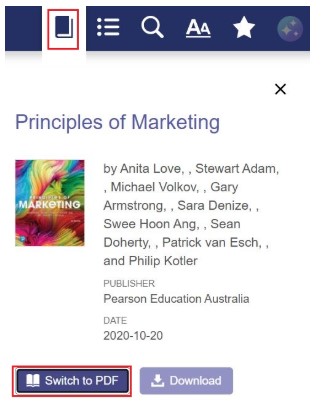
Some Ebook Central texts are taking a long time to load the EPUB Online Reader, and may display blank pages.
This issue is under development.
The work-around is to Switch to PDF view, from within the Online Reader.
Last updated: 15 September 2025
There is an ongoing issue affecting access to JSTOR off campus, whereby clients are receiving a "400 Bad Request / Request Header or Cookie Too Large” message.
To resolve the problem temporarily, clear your browser cookies and cache.
Unfortunately, the issue originates with a third party authentication application. We are awaiting a fix to be released.
Last Updated: 4 December 2024
Resource not working?
