Before you start: Always check if and how the use of generative artificial intelligence is permitted in the preparation of your assessment task. Unauthorised use of generative AI or paraphrasing tools can be a form of academic misconduct.
This resource will help you to:
use generative AI responsibly as a study tool.
recognise the benefits of using generative artificial intelligence (AI) as a tool for creating images.
construct effective prompts for communicating with generative AI programs.
GenAI tools can be used to generate images by using prompts. Some of the ways you can use GenAI tools to produce images include:
As with text, Gen AI tools can 'hallucinate' and create unusual and senseless representations or images. Always check the quality and add more prompts to refine the image where required.
Question to consider when writing your prompts include:
What format are you looking for?
What do you want included in the visual?
What colours would you like included?
What stylist elements are needed?
You will get better outcomes if you use clear and specific prompts. You may wish to consider these four elements as part of your prompt:
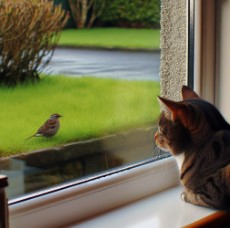
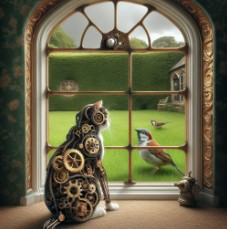
Consider the example below generated in Microsoft Copilot:
|
Prompt: Create an image of a cat looking out the window at a bird on the lawn. |
Prompt: Create an image of a cat looking out the window at a bird on the lawn in impressionist style. |
Prompt: Create an image of a cat looking out the window at a bird on the lawn in steampunk style. |
Images created using generative AI tools do not require referencing as they are not 'owned' by anyone. However, you may need to acknowledge the use of generative AI, depending upon your assignment. It is important to check each task for specific guidelines and instructions on GenAI use, whether it is permitted or not, and if the Course Coordinator requires an acknowledgement.
Did you know? UniSC students have access to Microsoft Copilot, enabling students to engage in AI-assisted research, content development, and image creation with enterprise-grade data protection and properly referenced, current information.
This resource has been adapted from Griffith University. (2024). Using generative AI ethically & responsibly. https://griffith.h5p.com/content/1292031535876431169#h5pbookid=1292031535876431169&chapter=h5p-interactive-book-chapter-8664c097-ac9b-41f5-b614-e428952daf13§ion=0